
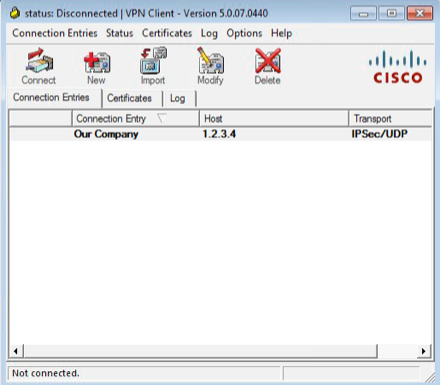
“I cannot connect with my Cisco IPSec VPN-client when I am behind a firewall”
“I can connect my VPN-client but can´t get any traffic thru”
“I have changed the settings on the Transport-tab and now I don´t know which settings are correct”
Have you heard them all? I have, plenty of times! In fact, IPSec can be really messy to get to work, because when it was invented there was no such thing as NAT devices and IPSec doesn´t play very well with address translations. There are workarounds. Alot of them. And that´s why it is a bit messy.
Client settings
In the client there are settings under the transport tab tha changes how the client communicates with the head end. Unfortunately, these settings are not protected which means that the end use can (and will!) changes these settings. So, what does the different settings mean?
Enable Transparent Tunneling: No
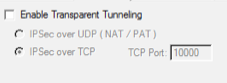
This mode is the vanilla way of IPSec by the book. The tunnel is setup by using ISAKMP (udp/500) and the actual data is sent as ESP (ip/50).
Because of the way ESP works it doesn´t work well if the client is behind a firewall or other NAT device. If outbound ISAKMP is allowed, the client can connect and authenticate. But the ESP-data will never get thru and the user will experience that the tunnel is broken even if he was able to login.
Enable Transparent Tunneling over UDP
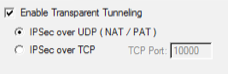 This is the most common way to overcome the limitations of ESP. The tunnel setup is still being done over ISAKMP (udp/500) but the actual data is encapsulated in udp-packets (udp/4500).
For this to work, the head end must be configured with ‘crypto isakmp nat-traversal‘. This command will cause the head end to tell the client during tunnel setup to send data over udp/4500 instead of ESP. Without this configured in the head end, the client will experience the same thing as when Transparent tunneling is disabled (see above) because it will still use ESP for data-transfer unless told otherwise by the head end.
Enable Transparent Tunneling over TCP
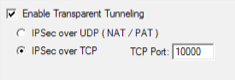
This setting is rarely being used. It was invented in the Cisco VPN3000 concentrator and is also supported in pix/ASA. By tunneling traffic over a TCP/port both the tunnel setup and the actual data is sent over that port. That means that ISAKMP (udp/500) is not being used when doing IPSec over TCP. The default port (and most common) is tcp/10000 but any port will do good. But, the port must be specified in the head end with the ‘crypto isakmp ipsec-over-tcp port 10000′ command.
Answers
So, what are the answers for the end user questions on top of this post? I would say:
Q: “I cannot connect with my Cisco IPSec VPN-client when I am behind a firewall”
A: Make sure that the firewall administrator at the current location makes sures that the following ports are opened outbound:
- udp/500 (ISAKMP)
- udp/4500 (IPSec nat-traversal)
- udp/10000 (IPSec over TCP)
Q: “I can connect my VPN-client but can´t get any traffic thru”
A: Enable transport tunneling over UDP in the Transport-tab and try again. If you can still connect but not communicate, make sure that the firewall administrator (at the site to which you are trying to connect!) enables nat-traversal with the ‘crypto isakmp nat-traversal’-command.
Q: “I have changed the settings on the Transport-tab and now I don´t know which settings are correct”
A: Duh! How would I know? 🙂 Ask your firewall administrator or IT helpdesk. If you still has a copy of the original .pcf-file, try to delete your current profile in the vpn-client and import the .pcf-file again.
My recommendations
Since there are a number of ways to configure the VPN client and the central firewall, which one should we use? Which one gives us least headache? I would say that you should choose from the below, in given order:
- Don´t. 🙂 Use AnyConnect instead of the old IPSec-client. There are zillions of reasons why, but they doesn´t fit into this blog post. Anyway. Migrate to AnyConnect if possible!
- Use Transparent Tunneling over UDP. Make sure that the central firewall is configured with NAT-traversal as explained above.
- Use Transparent Tunneling over TCP. But don´t. There is an extra overhead in encapsulating the end user traffic in yet another layer of TCP-sessions. UDP is better. But if you want to use TCP, use port 10000 because it is already entered by default in the vpn client.
- Use the client without transparent tunneling. You use GRE and will never get the client to work from behind a firewall. 🙂

Hi Jimmy, when you talk about “The commands for moving commands to privilege levels ” are you referring to a configuration to set locally on the network device (i.e. switch) or centrally on the ISE server?
Thanks – this post saved me some more t-shooting time this evening. I appreciate it!
Haha…..I am still laughing at myself. Don’t ask why 🙂 😛
attractive inspiring collection.wonderful created designs here!Thanks for sharing.
Hey There.I found your blog the use of msn. This is a really smartly written article.
I’ll bbe sujre to bookmark it and return to learn extra of your useful info.
Thanks for the post. I will definitely comeback.
Also visit mmy homepage; best vpn service
I’ve been exploring for a bit for any high-quality articles
or weblog posts on this sort of house . Exploring in Yahoo I eventually stumbled
upon this website. Reading this info So i am happy to show that I’ve a very good uncanny feeling I discovered
exactly what I needed. I such a lot without a doubt will make sure to do not put out of
your mind this web site and provides it a look regularly.