Cisco Cyber Threat Defense

by jimmy on 7 May, 2013 · 0 comments

I am currently attending an introduction class in Cisco Cyber Threat Defense. Since I never heard the phrase before I couldn´t wait showing up.


Cisco Cyber Threat Defense is a conceptual thing just like TrustSec. It brings several building blocks together to form an unique functionality. The pieces that CTD is built upon is StealthWatch from LanCope, Netflow-enabled devices from Cisco and Cisco Identity Services Engine ISE.


StealthWatch is a product that delivers information out of netflow data.Simply put, you tell all (or key) devices in your network infrastructure to send information about traffic flows via the protocol NetFlow to StealthWatch who analyses the data, turns it around, shakes it, boils it and puts it together again to present statistics out of the data. For example: which inside hosts generates the most traffic, what are the most common ports/protocols being used and which server/client conversation pairs eats up all bandwidth on our slow wan link?

Just like other NetFlow applications the GUI is really important. With so much stored data under the hood there must be an easy way to retrieve statistics out of StealthWatch and this product has really succeeded in this. It is really intiutive to build custom reports (documents as it is called by StealthWatch) and tweak filters to drill down exactly what you want to know.


But StealthWatch adds more functionalities to the concept of NetFlow. By analysing it further it can draw security-related conclusions. The key to this is baselining. StealthWatch learns the normal behaviour of hosts in the network when it comes to network traffic. Which hours are peak-time, what ports does that server normally listen to, how many outbound sessions does each inside host open at a given time frame and so on… With various thresholds StealthWatch can trigger events and alarms when it sees anomaly behaviour in the network.

One of the key features of StealthWatch that makes it possible to customize is the concept of host groups. In a hierarchical structure we define which hosts that belongs together by either geography, functionality or both. These host groups are then being used thruout the configuration interface. This makes it easy to treat all mailservers identically and separate them from printers or client computers.


Another key feature of the concept of CTD is the addition of Cisco ISE. With a connection between Cisco ISE and StealthWatch, the latter can receive Cisco Trustsec parameters from ISE and see information about MAC-addresses, profiled clients device type, whitch access switch/port it is connected to and so on. This is really powerful and promising for the future!


StealthWatch itself is built upon several blocks. There need to be a management server (SMC) which is a separate unit. Of course there needs to be Flow Collectors (FC). But also there is a separate FlowSensor (FS) which analyses traffic from a tap or span port and generates NetFlow-data. This is extremely powerful in environments that are not NetFlow enabled.  Also there is a FlowSensor VE which is a separate FlowSensor for vmware. This adds on NetFlow visibility for vm-to-vm-traffic and will also tell the SMC additional ESX-specific information such as VM hostnames.


As a NetFlow analyzer StealthWatch is a really powerful tool as such. Besides the security-features, StealthWatch itself can be a powerful tool to find overused (or underused) WAN-links and servers. Building maps of hostgroup-relationships gives you a good overview of the amount of traffic traveling between (and within) different parts of your network. Not as a Layer2/3 network topology map but more several totally customizable relationship-maps.


Cisco Cyber Threat Defense as a security solution also has its right to exist in my opinion. While it is not a IPS (since it doesn´t look deep into packets, it is not inline and it doesnt work with signatures) and not a CS-MARS (R.I.P) is clearly overlaps with both these solutions quite a bit.


Security-wise there are a few terms being used in the traffic-anomaly-analysis that is really powerful and also correlates well to similar functions both in IPS:es and CS-MARS. The Concern Index (CI) is a per host score-system that marks bad behaviour. The more bad traffic that host has generated the higher CI. In the same way there is a Target Index (TI) which is a score-system for attacked devices. Each attack raises the TI of our poor little inside server. These 2 terms are then being used as parameters in the different analysis engines that comes with the StealthWatch system.

Another nice feature is HostLocking. This is as close as you can get to Private Vlan with NetFlow. We define 2 servers (actually host groups, everything is configured related to host groups) and the HostLocking feature simply says that these 2 groups should never talk to each other. If there is traffic sent between these 2 host groups there is something fishy going on and an event is fired.

StealthWatch can currently mitigate attacks by sending syslog, snmp traps, emails, run expect-scripts and in a few other ways. However, it is still a bit limited. And it is important to point out that LanCope has no intention to build something that automatically shoots down all attackers, shuns port-scanners and shut downs switchports of bad users. It is possible to do, but it is not a key feature simply because (in my opinion) since this system relies on NetFlow and is not inline there is a delay and it is probably to late to react anyway (compared to an inline IPS that can decide not to forward one single atomic packet that looks suspicious).

StealthWatch also has its own Senderbase/WebRep-system called SLIC. This is a feed that constantly tells StealthWatch about known bad boys on internet. This feed automatically updates specific host groups in the system and this can be used to detect botnet control systems and treat them differently (block them).


Conclusion

When I first heard of  ”Cisco Cyber Threat Defense” it sounded so cool that I expected something like CS-MARS on steroids with neon-blue LED:s and unique features to automagically destroy all evil in world. Then reality hit me in my forehead and I understood that this is all about NetFlow, a protocol being around forever already. After having had a deep dive into the features of StealthWatch I now settle in between my first expectation and the reality-check. LanCope has really done their job well to squeeze as much information possible out of NetFlow!

In my humble opinion it is a pitty that StealthWatch uses SLIC and not the Cisco Senderbase WebRep-system.

Finally, a few screen shots:


{ 0 comments }

ASA Nat behavior with multiple public ip ranges changed after upgrade

March 11, 2013

I recently upgraded a customer ASA from v8.2 to 9.0 and while doing that I found out that some (yeah!) of the static NAT translations didn´t work after the upgrade. Skilled ASA-upgraders knows that this happens a lot. That´s why we (yes I hereby include myself in the ´skilled´-group) more often than not start our [...]

Read the full article →

Cisco ASA Anyconnect licensing for dummies

March 1, 2013

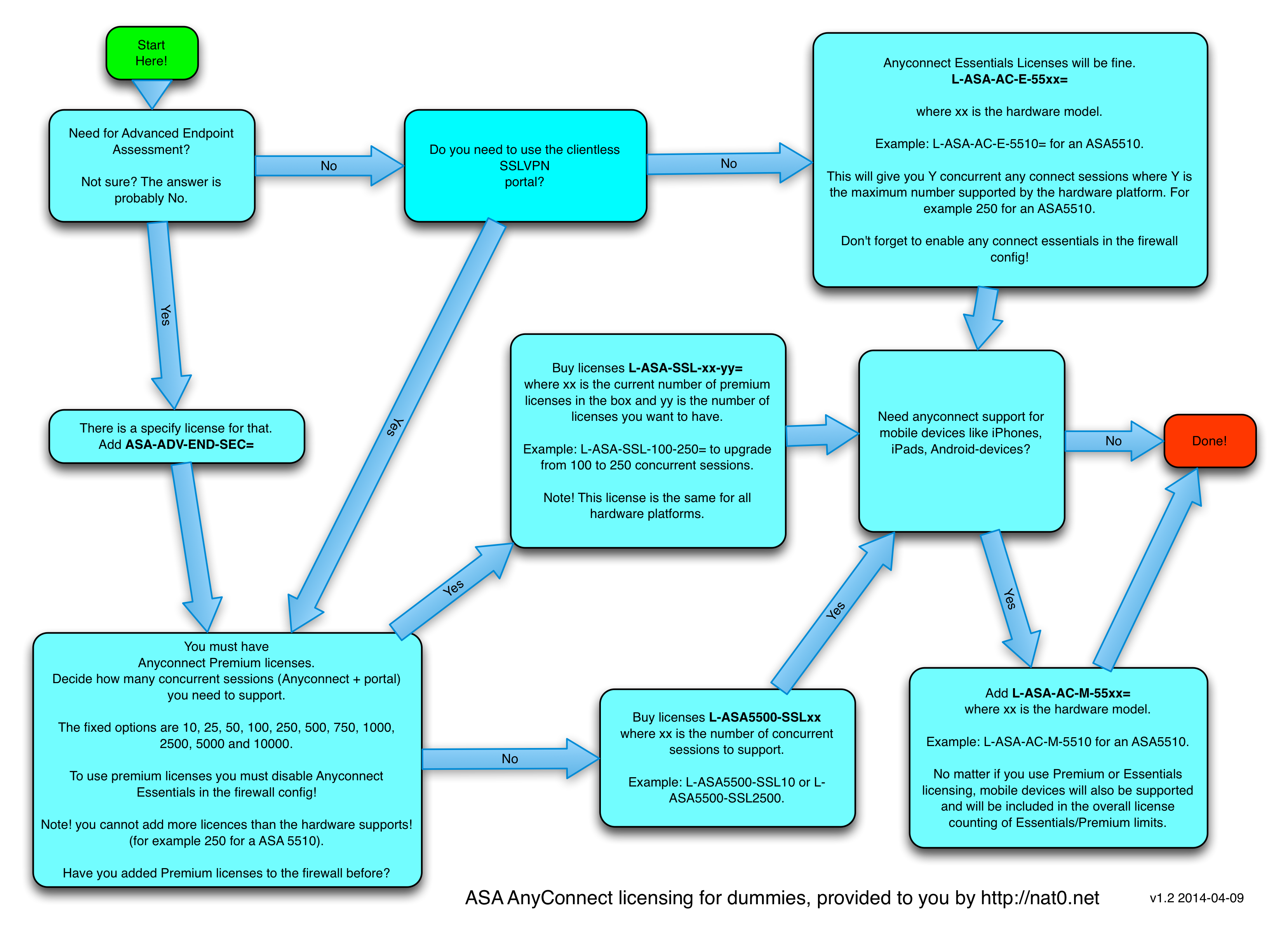
The picture below should be self-explaining. Click it for a larger version.   The text below is just for Google indexing purposes, please ignore. Do you need to use the clientless SSLVPN portal? Anyconnect Essentials Licenses will be fine. L-ASA-AC-E-55xx= where xx is the hardware model. Example: L-ASA-AC-E-5510= for an ASA5510. This will give you [...]

Read the full article →

Cisco CLI access using Radius and ISE

February 14, 2013

When releasing Cisco ISE as a “new ACS” questions quickly raised regarding the fact that there is no Tacacs+ support in ISE. With v1.0 of ISE Cisco said “Tacacs+ will come in a future version” but we haven´t seen it in v1.1, not in 1.1.1 and not in 1.2 either. Will it be added to [...]

Read the full article →

Cisco Live – Management of ASA CX firewalls

February 2, 2013

There is a lot of buzz around Cisco Prime. It’s obvious that Cisco put a lot of effort and money in this product. Primecisc will eventually be a whole suite of management tools under the same umbrella and my gut feeling is that this sooner and later will replace the entire Cisco Works suite.   [...]

Read the full article →

Cisco ASA 9.1 released

December 7, 2012

Without any prior notice Cisco released software version 9.1 for the ASA firewall.   The only new feature in 9.1 is CX support for other X-models than 5585-X. This probably means that it very soon will be possible to run CX-functionalities in all models from 5512-X up to 5585-X. I say ´soon´because still there doesn´t [...]

Read the full article →

Perverted NAT

November 6, 2012

This is probably the most perverted form of NAT I have ever done. <flamebait> But, it serves as a proof that with proper NAT there is no need for routing </flamebait>   Scope: There is a Cisco ASA running code 8.3+ that divides my home network 192.168.1.0/24 from my lab networks. My home devices uses [...]

Read the full article →

Cisco ASA v9.0 software released!

November 5, 2012

The long awaited 9.0 software for Cisco ASA firewall is now released and available for download from cisco.com. Here is a short list of the most obvious new features: Scansafe integration From now on there is built-in support for Cisco Cloud Web Security (formerly known as ScanSafe). Up until now the any support in ASA [...]

Read the full article →

Cisco IPSec VPN-client ports

April 11, 2012

“I cannot connect with my Cisco IPSec VPN-client when I am behind a firewall” “I can connect my VPN-client but can´t get any traffic thru” “I have changed the settings on the Transport-tab and now I don´t know which settings are correct”   Have you heard them all? I have, plenty of times! In fact, [...]

Read the full article →

New product: Cisco ASA CX

February 29, 2012

Yesterday at the RSA Conference Cisco released a new product named ASA CX. As usual when Cisco releases information about new products you have to dig alot to see thru all marketing material and find technical details. And so is defenately the case here also.   There are a few videos recentely uploaded to Youtube [...]

Read the full article →